QuickHire Developer Guide

Acknowledgements
This project, QuickHire, is built upon the Address Book Level 3 (AB3) project originally developed by the SE-EDU initiative. We extend our heartfelt thanks to the AB3 developers for laying the foundation that shaped our project’s structure and functionality.
We also gratefully acknowledge the creators of the following resources, libraries, and tools that were instrumental in bringing QuickHire to life:
- AB3 Codebase
- JavaFX
- JUnit
- Jackson Library
Their contributions and expertise made our work possible, and we deeply appreciate their support.
Additionally, we would like to thank StackOverflow. We had some inspiration for some of our features from the valuable answers provided by experienced coders in the platform.
Setting up, getting started
Refer to the guide Setting up and getting started.
Design
Architecture
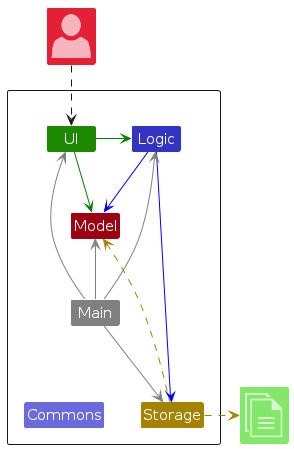
The Architecture Diagram given above explains the high-level design of the App.
Given below is a quick overview of main components and how they interact with each other.
Main components of the architecture
Main (consisting of classes Main and MainApp) is in charge of the app launch and shut down.
- At app launch, it initializes the other components in the correct sequence, and connects them up with each other.
- At shut down, it shuts down the other components and invokes cleanup methods where necessary.
The bulk of the app's work is done by the following four components:
UI: The UI of the App.Logic: The command executor.Model: Holds the data of the App in memory.Storage: Reads data from, and writes data to, the hard disk.
Commons represents a collection of classes used by multiple other components.
How the architecture components interact with each other
The Sequence Diagram below shows how the components interact with each other for the scenario where the user issues the command delete 1.
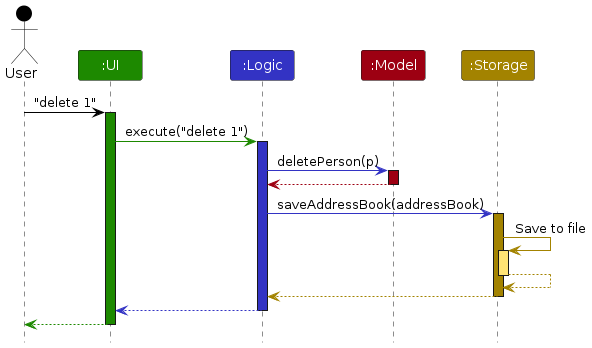
Each of the four main components (also shown in the diagram above),
- defines its API in an
interfacewith the same name as the Component. - implements its functionality using a concrete
{Component Name}Managerclass (which follows the corresponding APIinterfacementioned in the previous point.
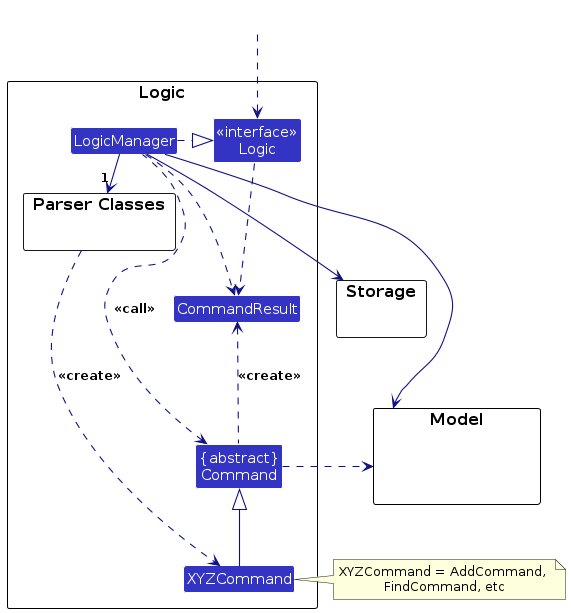
For example, the Logic component defines its API in the Logic.java interface and implements its functionality using the LogicManager.java class which follows the Logic interface. Other components interact with a given component through its interface rather than the concrete class (reason: to prevent outside component's being coupled to the implementation of a component), as illustrated in the (partial) class diagram below.

The sections below give more details of each component.
UI component
The API of this component is specified in Ui.java

The UI consists of a MainWindow that is made up of parts e.g.CommandBox, ResultDisplay, PersonListPanel, StatusBarFooter etc. All these, including the MainWindow, inherit from the abstract UiPart class which captures the commonalities between classes that represent parts of the visible GUI.
The UI component uses the JavaFx UI framework. The layout of these UI parts are defined in matching .fxml files that are in the src/main/resources/view folder. For example, the layout of the MainWindow is specified in MainWindow.fxml
The UI component,
- executes user commands using the
Logiccomponent. - listens for changes to
Modeldata so that the UI can be updated with the modified data. - keeps a reference to the
Logiccomponent, because theUIrelies on theLogicto execute commands. - depends on some classes in the
Modelcomponent, as it displaysPersonobject residing in theModel.
Logic component
API : Logic.java
Here's a (partial) class diagram of the Logic component:
The sequence diagram below illustrates the interactions within the Logic component, taking execute("delete 1") API call as an example.
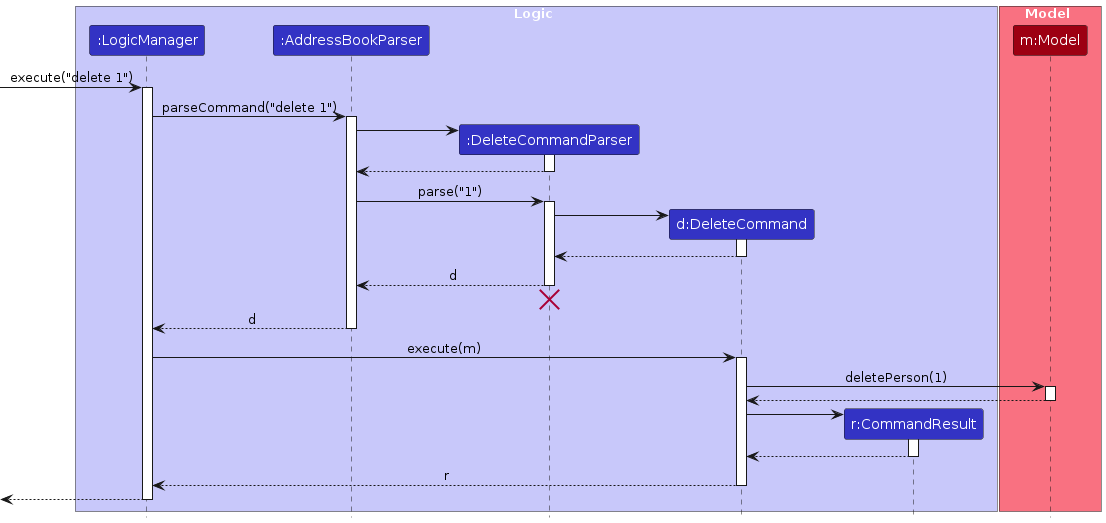
Note: The lifeline for DeleteCommandParser should end at the destroy marker (X) but due to a limitation of PlantUML, the lifeline continues till the end of diagram.
How the Logic component works:
- When
Logicis called upon to execute a command, it is passed to anAddressBookParserobject which in turn creates a parser that matches the command (e.g.,DeleteCommandParser) and uses it to parse the command. - This results in a
Commandobject (more precisely, an object of one of its subclasses e.g.,DeleteCommand) which is executed by theLogicManager. - The command can communicate with the
Modelwhen it is executed (e.g. to delete a person).
Note that although this is shown as a single step in the diagram above (for simplicity), in the code it can take several interactions (between the command object and theModel) to achieve. - The result of the command execution is encapsulated as a
CommandResultobject which is returned back fromLogic.
Here are the other classes in Logic (omitted from the class diagram above) that are used for parsing a user command:
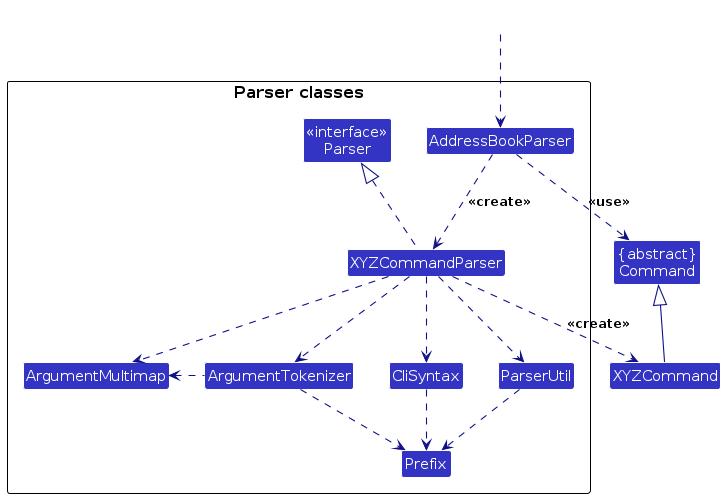
How the parsing works:
- When called upon to parse a user command, the
AddressBookParserclass creates anXYZCommandParser(XYZis a placeholder for the specific command name e.g.,AddCommandParser) which uses the other classes shown above to parse the user command and create aXYZCommandobject (e.g.,AddCommand) which theAddressBookParserreturns back as aCommandobject. - All
XYZCommandParserclasses (e.g.,AddCommandParser,DeleteCommandParser, ...) inherit from theParserinterface so that they can be treated similarly where possible e.g, during testing.
Model component
API : Model.java

The Model component,
- stores the address book data i.e., all
Personobjects (which are contained in aUniquePersonListobject). - stores the currently 'selected'
Personobjects (e.g., results of a search query) as a separate filtered list which is exposed to outsiders as an unmodifiableObservableList<Person>that can be 'observed' e.g. the UI can be bound to this list so that the UI automatically updates when the data in the list change. - stores a
UserPrefobject that represents the user’s preferences. This is exposed to the outside as aReadOnlyUserPrefobjects. - stores
Scheduleobjects as a separate list which is exposed to outsiders as an unmodifiableObservableList<Schedule>that can be observed. - does not depend on any of the other three components (as the
Modelrepresents data entities of the domain, they should make sense on their own without depending on other components)
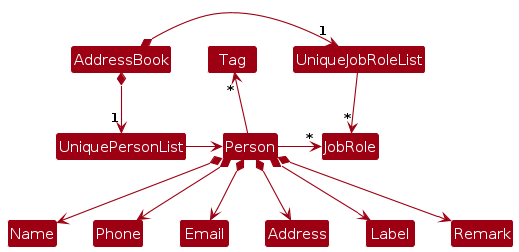
Note: An alternative (arguably, a more OOP) model is given below. It has a JobRole list in the AddressBook, which Person references.
Storage component
API : Storage.java
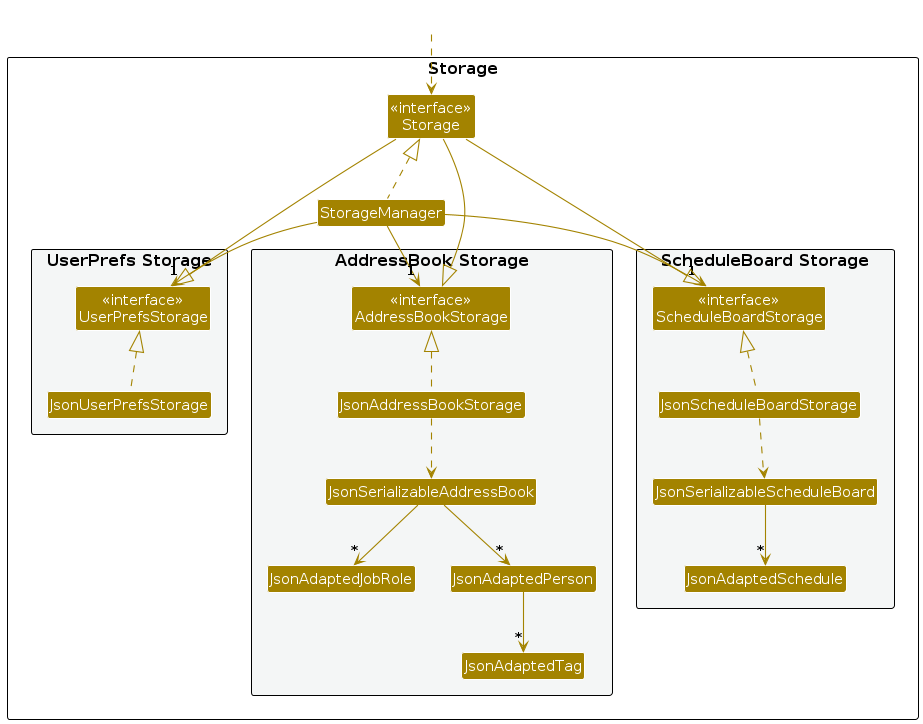
The Storage component,
- can save both address book data and user preference data in JSON format, and read them back into corresponding objects.
- inherits from
AddressBookStorage,UserPrefStorage, andScheduleBoardStoragewhich means it can be treated as either of the three (if only the functionality of only one is needed). - depends on some classes in the
Modelcomponent (because theStoragecomponent's job is to save/retrieve objects that belong to theModel)
Common classes
Classes used by multiple components are in the seedu.address.commons package.
Implementation
This section describes some noteworthy details on how certain features are implemented.
Note
Candidate are referred to as Person throughout the codebase due to legacy design choices.
Add Candidate and Add Interview Schedule feature
The Add Candidate and Add Schedule features both adhere to the Logic Component format described above and share a similar implementation structure.
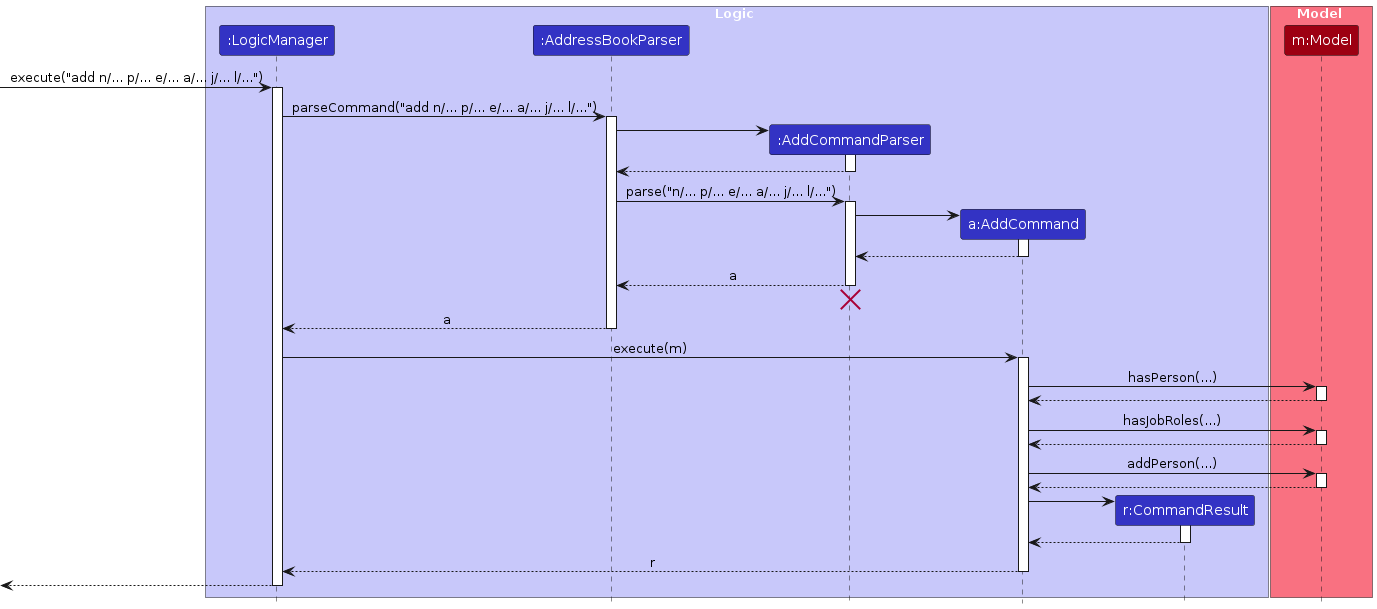
As an example, below is the sequence diagram for the Add Candidate command when the user inputs:
add n/Vish p/1293123 e/sample@domain.com a/213123 street j/ProData guy l/Rejected
Note
The implementation of the Add Schedule feature is similar to that of the example given above. However, instead of calling hasPerson(...), hasJobRoles(...), and addPerson(...) methods,
the methods hasSameDateTime(...) and addSchedule(...) in Model component will be called for adding a schedule.
Edit Candidate and Edit Interview Schedule feature
The Edit Candidate and Edit Interview Schedule features both adhere to the Logic Component format described above and share a similar implementation structure.
As an example, below is the sequence diagram for the Edit Candidate command when the user inputs:
edit 1 p/91234567 e/johndoe@example.com

Note
The implementation of the Edit Schedule feature is similar to that of the example given above. However,
the methods createEditedSchedule(...), hasSameDateTimeEdit(...), setSchedule(...), and updateFilteredScheduleList(...) in Model component will be called for adding a schedule.
Delete Candidate and Delete Interview Schedule feature
The Delete Candidate and Delete Schedule features both adhere to the Logic Component format described above and share a similar implementation structure.
As an example, below is the sequence diagram for the Delete Candidate command when the user inputs:
delete 1
Note
The implementation of the Delete Schedule feature is similar to that of the example given above. However, instead of calling getFilteredPersonList() and deletePerson(...) methods,
the methods getFilteredScheduleList() and deleteSchedule(...) in Model component will be called for deleting a schedule.
List Candidates/Interview Schedules and Clear Candidates/Interview Schedules feature
The List and Clear Candidate/Interview Schedules commands deviate slightly from the Logic Component format above because they require no arguments and thus bypass the Parser. Since both commands follow the same flow, we’ll illustrate only the sequence diagram for the Clear Candidates command when the user enters:
clear
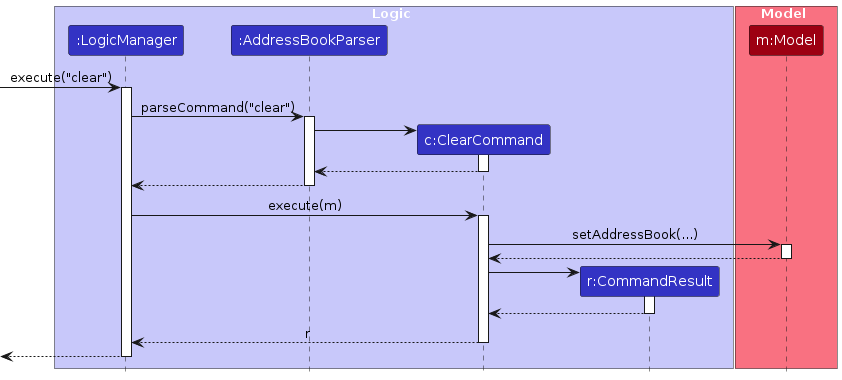
Main execution steps:
User Input: The user enters
clearto clear all candidates.Parsing:
LogicManagercallsparseCommand("clear")onAddressBookParser.Command Creation:
AddressBookParserrecognizes theclearcommand and directly instantiatesClearCommand(no arguments to parse).Execution:
LogicManagerinvokesexecute(model)on theClearCommand.Listing:
ClearCommandclear the current candidate list and updates the model.Result:
ClearCommandreturns aCommandResultindicating success, whichLogicManagerthen propagates back to the UI.
Note
The implementation of the List Candidates feature is similar to that of the example given above. However, instead of setAddressBook(...) method of the Model Component being called, updateFilteredPersonList(...) is called.
For Listing and Clearing schedules, the methods updateFilteredScheduleList(...) and setScheduleBoard(...) in Model component will be called respectively.
Storing data manually
The Storage component is used to save data automatically whenever a change to the data occurs. While the same
component can be used to store data manually, there are some limitations:
- Since
Storageinherits fromAddressBookStorage,ScheduleBoardStorageandUserPrefsStorage, any class implementingStoragewill have to adhere to the contracts of all three interfaces. While it makes sense for the general scope of the application, it doesn't make sense when the user only wishes to save data to a particular location at a particular point in time (and they do not necessarily wish to permanently save the data to this chosen location). - A workaround will be to implement the methods of
UserPrefsStorage, and return dummy values likeOptional#empty()forreadUserPrefs()or an empty String forgetUserPrefsFilePath()
- But this sounds more like we are forced to adhere to the contract of
UserPrefsStorage.
- But this sounds more like we are forced to adhere to the contract of
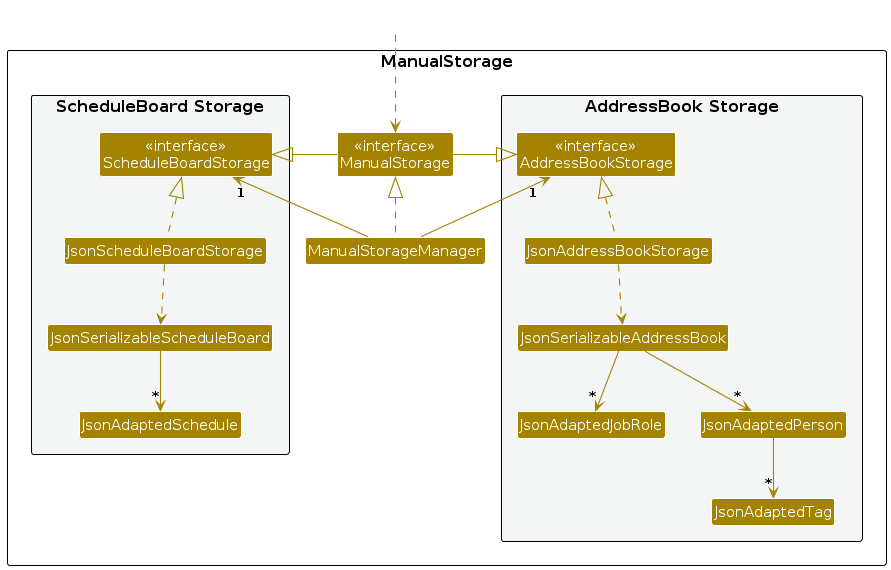
- The alternative will be to create a new storage component for manual storage:
ManualStorage- This interface will inherit from only
AddressBookStorageandScheduleBoardStorage. - A separate manager class,
ManualStorageManager, will implementManualStorageand implement methods for reading and writing data pertaining to candidates and interview schedules. - While this looks very similar to
StorageandStorageManager, the benefit is that, to store data manually, classes and objects no longer have to worry about dealing with user preferences.
- This interface will inherit from only
- The class diagram below depicts the relationship described:
The theme command
The theme command is used to change the theme of the GUI to either light or dark theme.
The theme command was implemented after the theme button.
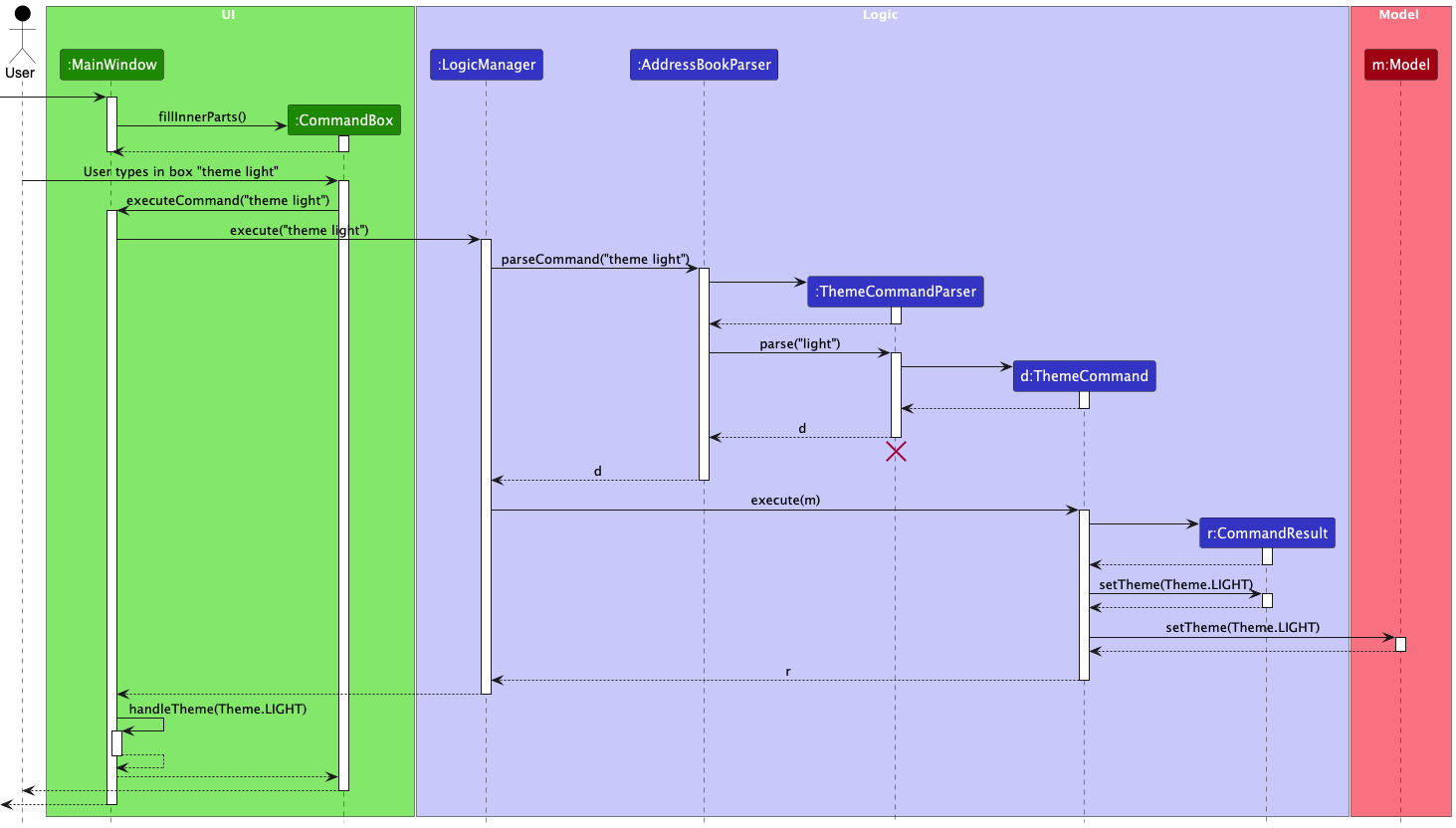
- This command is implemeted using the
themeCommandandThemeclasses and it is similar to the handling of the other commands to some extent. - Implementation:
- It makes use command architecture that other components also use. It has its seperate
themeCommandParserclass and thethemeCommandclass's exectue method returns acommandResult. - This is handled by the logic component similar to the rest however in the below PML diagram the UI-Logic interaction is also shown below as it is actually the MainWindow class that is responsible for resetting the stylesheets using its handleTheme() method, which is why the UI component was included here as oppossed to other diagrams like that of the deleteCommand.
- It is also good to note that it is saved the same way that
GUISettingsare saved through theUserPrefsclass along with relevant methods to execute the same.
- It makes use command architecture that other components also use. It has its seperate
The viewstats command
The viewstats command is used to display job applicant statistics grouped by job roles in a dedicated statistics window. The viewstats command was implemented after the initial set of core commands (like help and list).
- This command is implemented using the
ViewStatsCommandclass and it is similar to the handling of other commands to some extent. - Implementation:
- It follows the same command architecture pattern:
- A separate
ViewStatsCommandParserclass is used to parse the command input ("viewstats"). - The
ViewStatsCommandclass'sexecute(...)method returns aCommandResult.
- A separate
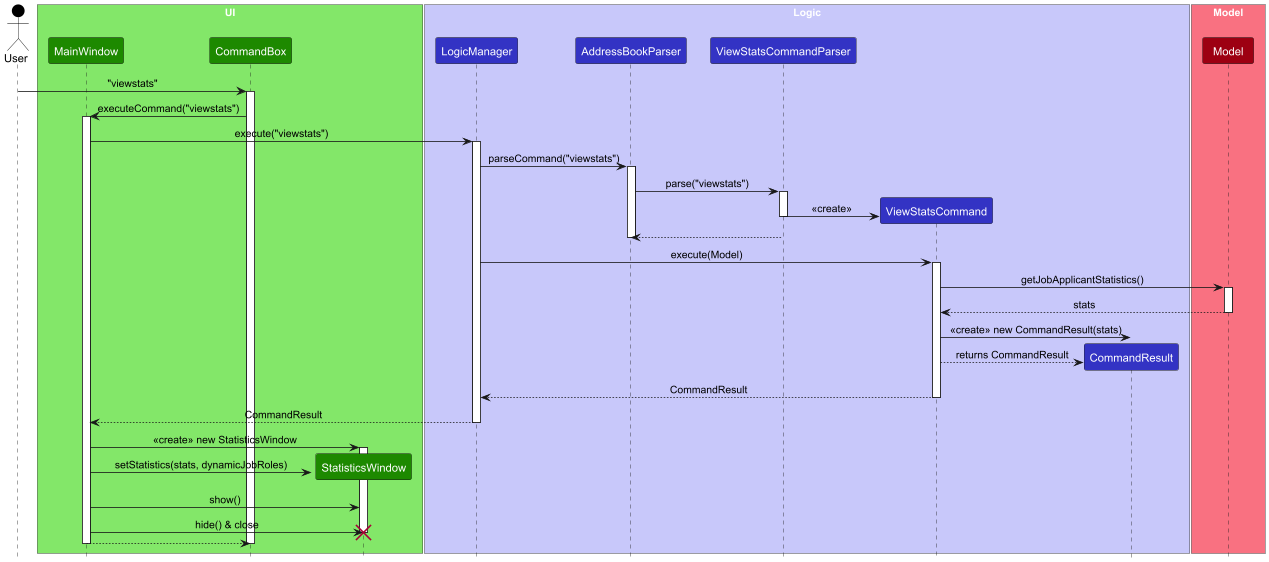
- When
execute(...)is called, theViewStatsCommandaggregates job application statistics by callinggetJobApplicantStatistics()on theModel. - The resulting
CommandResultholds a mapping of job roles to applicant counts. - The
MainWindowdetects that the command result contains statistics and opens (or focuses) aStatisticsWindow. - The
StatisticsWindowis set to be:- Singleton: only one statistics window can be opened at any time.
- Non-resizable: prevents the user from manually resizing the window.
- Bound to application exit: it automatically closes when the main window closes.
- The window obtains a dynamic list of job roles via
ModelManager#getFilteredJobRolesList(), which is used to render the chart.
- It follows the same command architecture pattern:
Below is the sequence diagram showing how viewstats is parsed, executed, and displayed:
Note
The
StatisticsWindowdesign uses similar principles to theHelpWindow. The main difference is thatStatisticsWindowdisplays a bar chart (inStatisticsPanel.fxml) rather than static text. Additionally, the window is strictly non-resizable and will not allow multiple instances to appear simultaneously.
[Proposed] Data archiving
{Explain here how the data archiving feature will be implemented}
Documentation, logging, testing, configuration, dev-ops
Appendix: Requirements
Product scope
Target user profile:
- a hiring recruiter for a tech company, frequently managing a high volume of candidate profiles
- needs to search, update, and organize candidate contacts quickly
- prefers desktop apps over other types
- prefers typing over using a mouse
- works alone and only share contact data with superiors
- can type fast
- is reasonably comfortable using CLI apps
- finds searching and filtering candidates' details in spreadsheets time-consuming
Value proposition: to be able to manage candidates' details and provide a more efficient way to organize potential candidates to their company compared to traditional methods. It is optimized for hiring recruiters who prefer a CLI.
User stories
Priorities: High (must have) - * * *, Medium (nice to have) - * *, Low (unlikely to have) - *
| Priority | As a … | I want to … | So that I can… |
|---|---|---|---|
* * * | user | add a new applicant's contact details | start adding new applicant's details into the application quickly |
* * * | user | list all applicants' contact | verify the stored data |
* * * | user | delete applicant's contact | remove applicants that are no longer applying for a job |
* * * | user | exit the application | |
* * | user | label a candidates application status | keep track of applicants status and prioritise those who are yet unreviewed |
* * | user | have all my applicant's contact saved automatically | use the application without losing any changes made |
* * | user | find an applicant's contact | locate details of persons without having to go through the entire list |
* * | new user | view usage instructions | refer to instructions when I forget how to use the application |
* * | user | edit an applicant's contact | rectify any discrepancies in the applicant's contact details |
* * | new user | import my list of applicant's contact | seamlessly migrate data from using one device to this another |
* * | user | add remarks to an applicant's contact details | note down interesting details about a candidate |
* * | user | backup the data of past applicants | recover the data in case of any issues |
* * | user | view statistics of applications to a specific role | make informed decisions on recruiting priorities |
* * | user | add an interview schedule for a candidate | keep track of upcoming interviews and stay organized |
* * | user | delete an interview schedule for a candidate | remove outdated or cancelled interviews |
* * | user | edit an interview schedule for a candidate | update interview details when changes occur |
* * | user | clear all interview schedules | reset the schedule for re-planning or when starting a new recruitment cycle |
* * | user | manually save data pertaining to applicants and their interview schedules | backup the data for archival and recovery purposes |
* * | user | filter through job titles easily | shortlist candidates to fill the vacant job position |
* | new user | play around with sample data | gain more familiarity with using the application |
* | user | change the theme of the UI | use whichever I prefer based on my vison and environment |
Use Cases
Use case: UC01 - Listing candidates
MSS
User requests the list of candidate
QuickHire shows the list of candidate
Use case ends.
Extensions
2a. The list is empty.
- 2a1. Notify user about the empty list.
Use case ends.
Use case: UC02 - Add a candidate
MSS
User requests to add a candidate
QuickHire adds a new candidate
Use case ends.
Extensions
2a. Duplicate candidate.
- 2a1. QuickHire shows an error message.
Use case ends.
2b. The given parameters are invalid
2b1. QuickHire shows an invalid parameter error message.
Use case ends.
Use case: UC03 - Delete a candidate
MSS
- User lists candidate (UC01)
- User requests to delete a specific candidate in the list
- QuickHire deletes the candidate
Use case ends.
Extensions
2a. The given index is out of range.
2a1. QuickHire shows and OutOfRange error.
Use case resumes at step 2.
2b. The given parameters are invalid.
2b1. QuickHire shows an error message.
Use case ends.
Use Case: UC04 - Exiting the Application
MSS
User requests to exit the application
QuickHire exits the application
Use case ends.
Use Case: UC05 - Edit a candidate information
MSS
- User lists candidate (UC01)
- User requests to edit details of a specific candidate in the list
- QuickHire edits the specified details
Use case ends.
Extension
2a. The list is empty.
Use case ends.
2b. The given index is invalid.
2b1. QuickHire shows an error message.
Use case resumes at step 2.
2c. The given parameters are invalid.
2c1. QuickHire shows an error message.
Use case ends.
Use Case: UC06 - Adding remarks to a candidate
MSS
User requests to add remarks to a candidate
QuickHire adds the given remark to the candidate's details
Use case ends.
Use Case: UC07 - Finding candidate(s)
MSS
User request to find candidate using some keywords
QuickHire shows the list of candidate matching the provided keywords
Use case ends.
Extensions
2a. The list is empty (i.e., keywords did not match any applicants).
2a1. Notify user about the empty list.
Use case ends.
Use Case: UC08 - Viewing statistics of applications to a specific job
MSS
- User requests to view statistics of applications to a specific job
- QuickHire shows the list of jobs and their corresponding number of applications
Extensions
2a. The stats list is empty (i.e., no one applied for a job)
2a1. Notify user about empty list
Use case ends.
Use Case: UC09 - Saving details of candidate into a file
MSS
User requests to save data of candidate and interview schedules into two separate files
QuickHire saves the displayed list of candidate and interview schedules into the specified files
Use case ends.
Extensions
2a. User requests to save all applicants into the file
2a1. QuickHire saves all applicants into the file
Use case ends.
2b. File(s) specified by user already exists in the system
2b1. QuickHire displays error message saying that the file(s) already exists
Use case ends.
2c. File(s) specified by user already exists in the system, and user requests to overwrite any existing file
2c1. QuickHire saves details of applicants to the file(s) (without any errors)
Use case ends.
2d. User does not provide either file
2d1. QuickHire display error message indicating the command format
Use case ends.
Use Case: UC10 - Saving details of filtered data (of candidate)
MSS
User finds candidates (UC07)
User requests to save candidates into a file
QuickHire saves the displayed list of candidates into a file
Use case ends.
Extensions
2a. File exists and user did not request to overwrite file
2a1. Notify user that file already exists
Use case ends.
2b. User requests to save all data
2b1. Save all data (instead of just filtered ones) into file
Use case ends.
Use case: UC11 - Listing interview schedules
Similar to use case 01 except for using to list schedules
Use case: UC12 - Adding an interview schedule
MSS
User requests to add an interview schedule
QuickHire adds a new schedule
Use case ends.
Extensions
2a. Timing clashed with existing interview schedules.
2a1. QuickHire shows an error message.
Use case ends.
2b. The given parameters are invalid.
2b1. QuickHire shows an error message.
Use case ends.
Use case: UC13 - Delete an interview schedule
Similar to use case 03 except for using to delete an interview schedule.
Use Case: UC14 - Edit an interview schedule
MSS
- User lists interview schedules (UC11)
- User requests to edit details of a specific schedule in the list
- QuickHire edits the specified details
Use case ends.
Extension
2a. The list is empty.
Use case ends.
2b. The given index is invalid.
2b1. QuickHire shows an error message.
Use case resumes at step 2.
2c. The given parameters are invalid.
2c1. QuickHire shows an error message.
Use case ends
Use case: UC15 - Clear all interview schedules
MSS
User requests to clear the list of interview schedules
QuickHire shows the empty list of interview schedules
Use case ends.
Use Case: UC16 - Changing theme of the UI
MSS
User requests to change theme to a specific theme
QuickHire changed to requested theme
Use case ends.
Extensions
1a. User specified incorrect theme
1b1. Notify user of incorrect value
Use case ends.
Use case: UC17 - Listing job roles
Similar to UC01 - Listing candidates except it is for job role instead of candidates
Use case: UC18 - Add a job role
Similar to UC02 - Add a candidate except it is for job role instead of candidates
Use case: UC19 - Delete a job role
Similar to UC03 - Delete a candidate except it is for job role instead of candidates
Non-Functional Requirements
- Should work on any mainstream OS as long as it has Java
17or above installed. - Should be able to hold up to 1000 candidates for hire without a noticeable sluggishness in performance for typical usage.
- A user with above average typing speed for regular English text (i.e. not code, not system admin commands) should be able to accomplish most of the tasks faster using commands than using the mouse.
- All user commands can work without internet without any noticable difference.
- All user commands have a response time of under 5 seconds, (assuming <= 1000 candidates).
- The system should be able to handle a growing number of candidates for hire without a noticable dip in performance.
- The system should be usable by anyone, including novice users.
- The system should store all data locally, hence no requirement for a server.
Glossary
- Mainstream OS: Windows, Linux, Unix, MacOS
- Locally: A location on the users Hardrive/SSD.
- Server: An external offline location accessed through the internet for the storage of large data.
- Novice users: Users with limited to no prior command-line operation knowledge.
Appendix: Instructions for manual testing
Given below are instructions to test the app manually.
Note: These instructions only provide a starting point for testers to work on; testers are expected to do more exploratory testing.
Launch and shutdown
Initial launch
Download the jar file and copy into an empty folder
Double-click the jar file Expected: Shows the GUI with a set of sample contacts. The window size may not be optimum.
Saving window preferences
Resize the window to an optimum size. Move the window to a different location. Close the window.
Re-launch the app by double-clicking the jar file.
Expected: The most recent window size and location is retained.
{ more test cases … }
Adding a candidate
Adding a person while all candidates are being shown (valid and invalid)
Prerequisites: No entry below is already in the candidate list.
Test case:
add n/John Doe p/98765432 e/johnd@example.com a/311, Clementi Ave 2, #02-25 j/Data Scientist l/Unreviewed r/Likes to code t/friends t/owesMoney
Expected: Candidate is added to list. Details of the added contact shown in the result box.Test case:
add
Expected: No candidate is added. General error details shown in the result box.Test case:
add n/Vish p/1293123 e/sample@domain.com a/213123 street l/RejectedExpected: No candidate is added. Specific error message detailing missing fields shown. (Job Role missing)
Adding a person : Testing duplicate entries
Prerequisites: The same person is already in the candidate list.
Test case:
add n/John Doe p/98765432 e/johnd@example.com a/311, Clementi Ave 2, #02-25 j/Data Scientist l/Unreviewed r/Likes to code t/friends t/owesMoney
Expected: Candidate is already in list. Duplicate error message shown.
Adding a person : Testing individual parameters
Prerequisites: The same person is already in the candidate list.
Test case:
add n/John Who p/98765431 e/johnw@example.com a/311, Clementi Ave 2, #02-25 j/Data Scientist l/funny r/Likes to code t/friends t/owesMoney
Expected: No candidate is added. Label is not in valid format error message shown.Test case:
add n/John Who p/98765431 e/yeetus.example.com a/311, Clementi Ave 2, #02-25 j/Data Scientist l/funny r/Likes to code t/friends t/owesMoney
Expected: No candidate is added. Email is not in valid format error message shown.The test cases may be repeated for all parameters in a similar fashion.
{ more test cases … }
Deleting a person
Deleting a person while all persons are being shown
Prerequisites: List all persons using the
listcommand. Multiple persons in the list.Test case:
delete 1
Expected: First contact is deleted from the list. Details of the deleted contact shown in the status message. Timestamp in the status bar is updated.Test case:
delete 0
Expected: No person is deleted. Error details shown in the status message. Status bar remains the same.Other incorrect delete commands to try:
delete,delete x,...(where x is larger than the list size)
Expected: Similar to previous.
Adding a schedule
Adding a schedule that does not overlap with existing schedule
- Prerequisites: Interview schedule with date and duration
2025-05-03 09:00 10:00exists and there is at least 1 candidate in the candidate list. - Test case:
sadd c/1 s/2025-05-03 15:00 17:00 m/online
Expected: Schedule with date and duration2025-05-03 15:00 17:00, modeonlinealong with the name and email of first candidate is created. Details of the schedule created is shown in the message box. Schedule board shows newly created schedule.
- Prerequisites: Interview schedule with date and duration
Adding a schedule that overlap with existing schedule
- Prerequisites: Interview schedule with date and duration
2025-05-16 14:00 16:00exist and there are at least 1 candidate in the candidate list. - Test case:
sadd c/1 s/2025-05-16 14:00 15:00 m/online
Expected: Schedule is not added to the schedule board. Error message is shown in the message box.
- Prerequisites: Interview schedule with date and duration
Editing a schedule
Editing one or more details of a schedule
Prerequisites: Interview schedule with date and duration
2025-05-03 15:00 17:00does not exist and the mode of first interview schedule in the list is online.Test case:
sedit 1 s/2025-05-03 15:00 17:00Expected: Date and duration of the first schedule is changed to
2025-05-03 15:00 17:00. Details of the edited schedule is shown in the message box. Schedule board shows newly edited schedule.Test case:
sedit 1 m/offlineExpected: Mode of the first schedule is changed to
offline. Details of the edited schedule is shown in the message box. Schedule board shows newly edited schedule.
Editing date and duration of a schedule to clash with another schedule in the schedule board
Prerequisites: Schedule with date and duration
2025-05-04 14:00 15:00existsTest case:
sedit 1 s/2025-05-04 14:00 14:30Expected: Date and duration of first schedule is not updated. Error message is shown in the message box.
Deleting a schedule
Deleting a schedule while all schedules are being shown
Prerequisites: List all schedule using the
slistcommand. Multiple schedules in the list.Test case:
sdelete 1
Expected: First schedule is deleted from the list. Details of the deleted schedule shown in the status message.Test case:
sdelete 0
Expected: No schedule is deleted. Error details shown in the status message.Other incorrect delete commands to try:
sdelete,sdelete x,...(where x is larger than the list size)
Expected: Similar to previous.
Manually Saving data
Manually saving the data of the program
Prerequisites: You should have sufficient write permissions to the file path you are saving the data to.
Test case:
save c/candidates.json s/schedules.json- Expected (if both files do not exist): Two json files,
[JAR file location]/candidates.jsonand[JAR file location]/schedules.json, should be created with the corresponding filtered candidates and schedules data respectively. - Expected (if
[JAR file location]/candidates.jsonexists): An error message specifying that[JAR file location]/candidates.jsonexists. - Expected (if
[JAR file location]/schedules.json): An error message specifying that[JAR file location]/schedules.jsonexists. - Expected (if both files exist): An error message specifying that
[JAR file location]/candidates.jsonexists.- Reason: The save command processes the candidates file first, then the schedules file, regardless of the order in which the parameters were typed in.
- Expected (if both files do not exist): Two json files,
Test case:
save c/candidates.json- Expected (file does not exist): A single json file,
[JAR file location]/candidates.jsonshould be created with the corresponding filtered candidates data. - Expected (file exists): An error message specifying that
[JAR file location]/candidates.jsonexists.
- Expected (file does not exist): A single json file,
Test case:
save s/schedules.json- Expected (file does not exist): A single json file,
[JAR file location]/schedules.json, should be created with the corresponding schedules data. - Expected (file exists): An error message specifying that
[JAR file location]/schedules.jsonexists.
- Expected (file does not exist): A single json file,
Test case:
save c/candidates.json s/schedules.json /f- Expected: Two json files,
[JAR file location]/candidates.jsonand[JAR file location]/schedules.json, should be created with the corresponding filtered candidates and schedules data respectively.
- Expected: Two json files,
Test case:
save c/candidates.json /f- Expected: A single json file,
[JAR file location]/candidates.jsonshould be created with the corresponding filtered candidates data.
- Expected: A single json file,
Test case:
save s/schedules.json /f- Expected: A single json file,
[JAR file location]/schedules.json, should be created with the corresponding schedules data.
- Expected: A single json file,
Test case:
save c/candidates.json /fwith and without/aflag- Prerequisite: Candidate data has been filtered using the
findcommand - Expected: A single json file,
[JAR file location]/candidates.json, should be created with the corresponding filtered candidates data. - Repeat the command with
/aflag without runninglist:save c/candidate.json /f /a - Expected: A single json file,
[JAR file location]/candidates.json, should be created with all corresponding candidates data.
- Prerequisite: Candidate data has been filtered using the
Test case:
save- Expected: Error message displayed, specifying the command format.
Theme command
Changing the theme of the program.
Prerequisites: none
Test case:
theme light
Expected: UI switches to light theme. Help window switches to light theme. Viewstats command switches theme to light theme. Theme Changed message displayed.
Note: The same may be repeated fortheme dark.Test case:
theme blue
Expected: Error message displayed, theme does not change.
Change theme is saved.
- Test case:
theme lightfollowed byexit. Reopen the jar file.
Expected: Theme is saved as theme light when you open.
- Test case:
{ more test cases … }
Appendix: Effort
Difficulty level: QuickHire is considerably challenging because of the integration of additional entities and the complexity of managing the relationships between them.
Challenges faced:
- Additional entity: The project introduces new entity
Scheduleand connects it withPersonthroughNameandEmail. - Feature Development: To support the new Schedule entity, we had to develop several new core features, such as adding schedule, editing schedule, deleting schedule, listing schedule and clearing schedule.
- User Interface Enhancements: To make the application more intuitive and user‑friendly, we revamped the GUI—adding dedicated schedule sections and refining the overall design for a smoother, more cohesive experience.
- Additional entity: The project introduces new entity
Effort required:
- We estimate the project demanded as equal as the anticipated effort because of the added entities and expanded features. To ensure robustness and maintainability, we prioritized comprehensive testing and strict adherence to coding standards. Driven by passion and a commitment to learning, we consistently went the extra mile throughout development.
Achievements:
- Introduce new schedule features that allow user to create and maintain interview schedules for candidates.
- Introduce the ability to change between 2 themes, light and dark.
- Introduce Job Role related features to allow users to add, edit and delete Job Roles.
Appendix: Planned Enhancements
Team size: 5
- Restrict interview dates to a reasonable range. Currently, users can schedule interviews for dates very far in the past or future. We plan to apply a constraint that the user may only schedule interview date that is within 20 years before or after current date.
- The current implementation cannot verify whether an interview that spans midnight (i.e., crosses two consecutive days) has a duration between 15 minutes and 4 hours. We plan to add a check to ensure that any interview for the same candidate crossing into the next day also falls within that 15‑minute to 4‑hour window.
- The current deleteJ command does modify users who has the corresponding job role, which would be updated as
UNRECOGNISEDthe next time the application is loaded. We plan to notify users which candidates have such job role and provide users with an easier way of updating them. - The viewing box of the view command will require scrolling if any parameters become too long. We plan enforce wrapping of all items in the window, to avoid unnecessarily long inner box size.
- The current implementation also has an issue with proper verification of duplicate candidate. We plan to add an NRIC/Unique ID field to each candidate to ensure better duplicate handling.